Standard Work

Processing Incoming CSENet Transaction 3/2/2026 v.1

Process Owner: Intergovernmental and Compliance

Purpose: To outline the steps for processing an incoming Child Support Enforcement Network (CSENet) request.

Review Cadence: Annually


Document Version Control

Version #

Revision Date

Edited By

Change Log

Other Notes


Supporting Related Documents

Document Name

Description/Link

CSENets in Arizona Case Record System (AZCARES)

List of T_Codes for CSENets

Office of Child Support Enforcement (OCSE)- CSENet Interface Guidance Document

CSENet IGD Appendix B Valid Transactions Table


Standard Work

Sequence

Step Description

1

  1. Navigating to a T_Code Task:
  2. User navigates to the top ribbon of tabs in AZCARES and clicks on the Task tab.
  3.  
  4. Using the drop-down in the top-left corner, select My Open Tasks. Select a T_code or use the search box to search for a specific code (by subject name).
  5.  
  6.  
  7. Note: For further details on specific CSENet codes, refer to the following table:
  8. List of T_Codes for CSENets
  9.  
  10. The Office of Child Support Enforcement (OCSE)'s complete list of CSENets is available on their website.

2

  1. Opening a CSENet Transaction:
  2. Click on the AZCARES Case number on the task to open the case.
  3. Navigate to the Intergovernmental Record on the left tab.
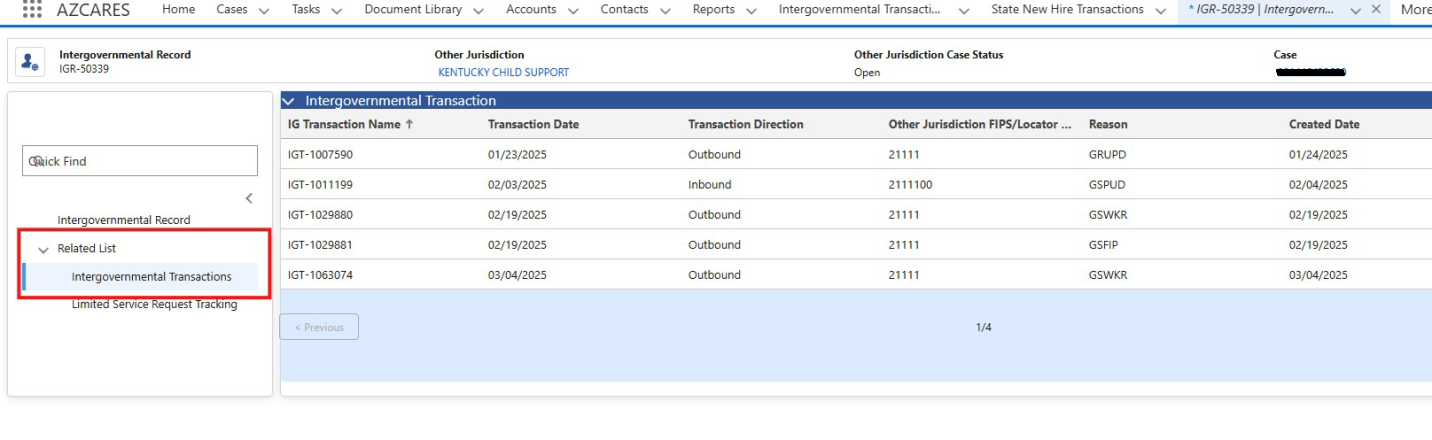
  4. Click the eyeball icon for the Other Jurisdiction Intergovernmental Record to open it. On the left side panel, select the Intergovernmental Transactions tab.

3

  1. Locating a CSENet Transaction:
  2. The Intergovernmental Transaction list will be displayed. Double-click the Transaction Date column to sort the items by date.
  3. Under Actions, click on the eyeball icon of the inbound transaction you want to work on.
  4.  
  5.  
  6. Tip: Use the Created Date in the related T Code task to identify which inbound transaction to select.

4

  1. Reading a CSENet Transaction:
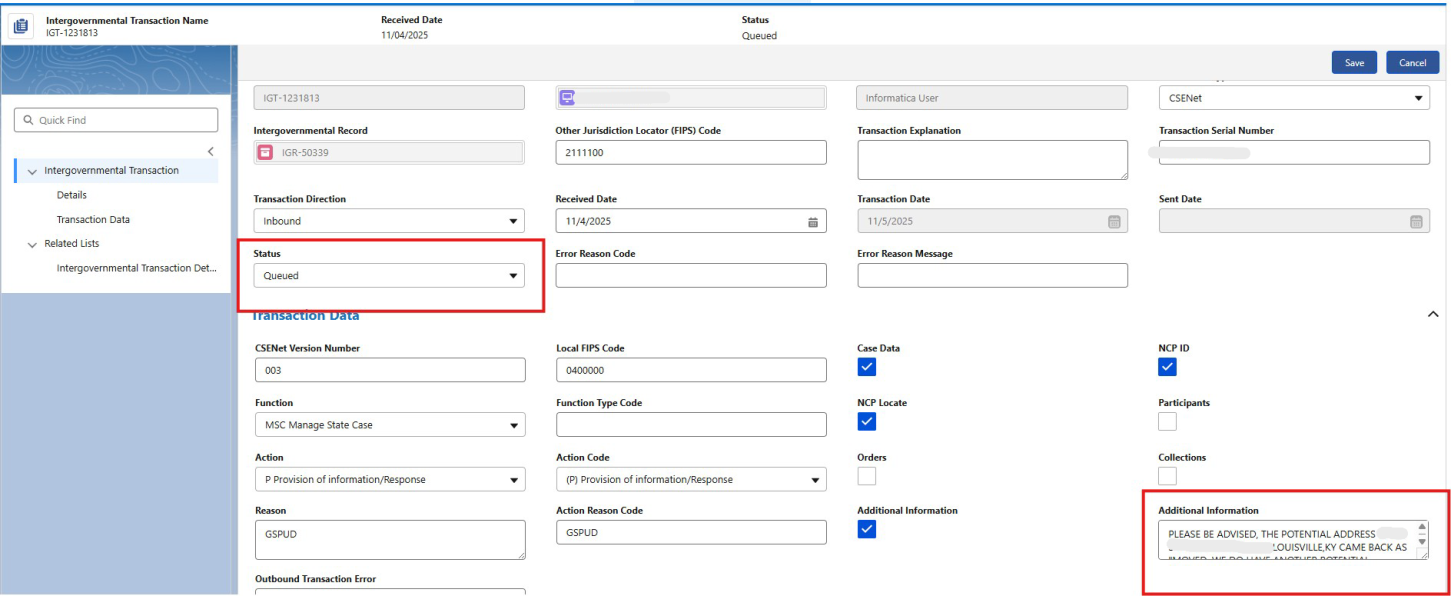
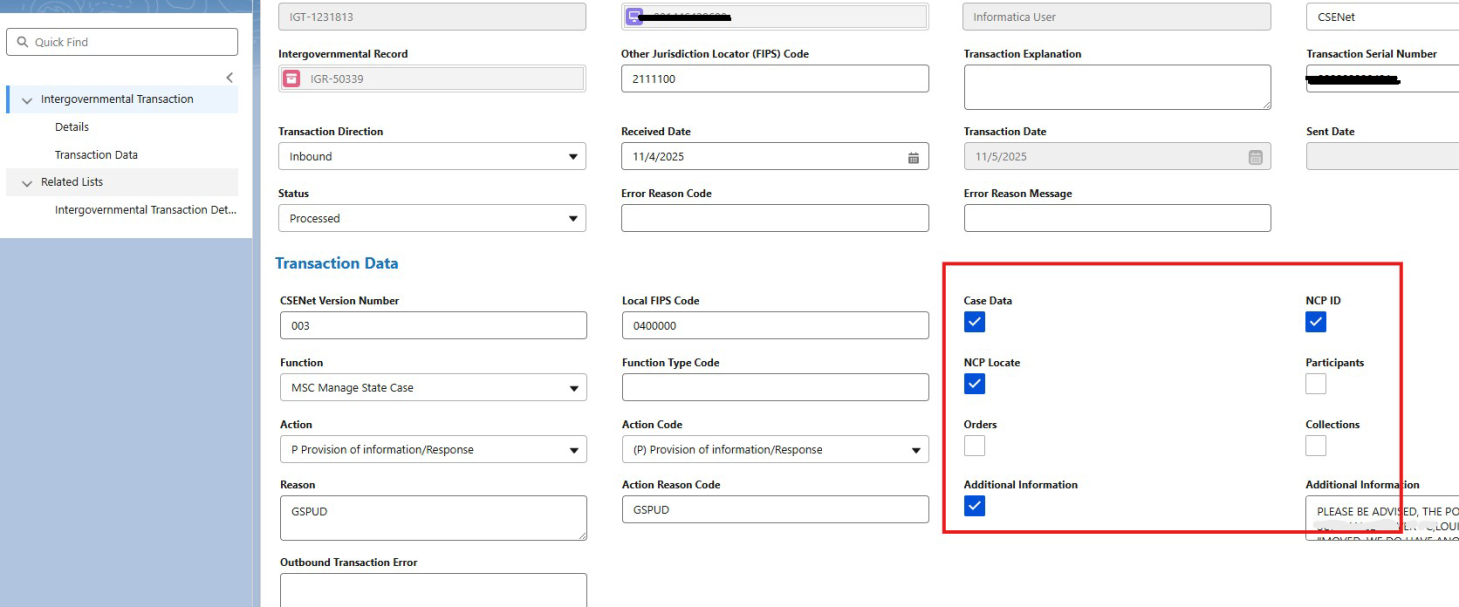
  2. The Intergovernmental Transaction will open.
  3. If the status says “Queued”, the transaction has not been reviewed.
  4. If necessary, refer to the Office of Child Support Enforcement CSENet IGD Appendix B Valid Transactions for information on CSENet types.
  5. In the bottom right corner, the Additional Information box will display the information being provided.
  6. Copy the information by highlighting it and right-clicking. Select “Copy”.

5

  1. Reading Intergovernmental Transaction Details:
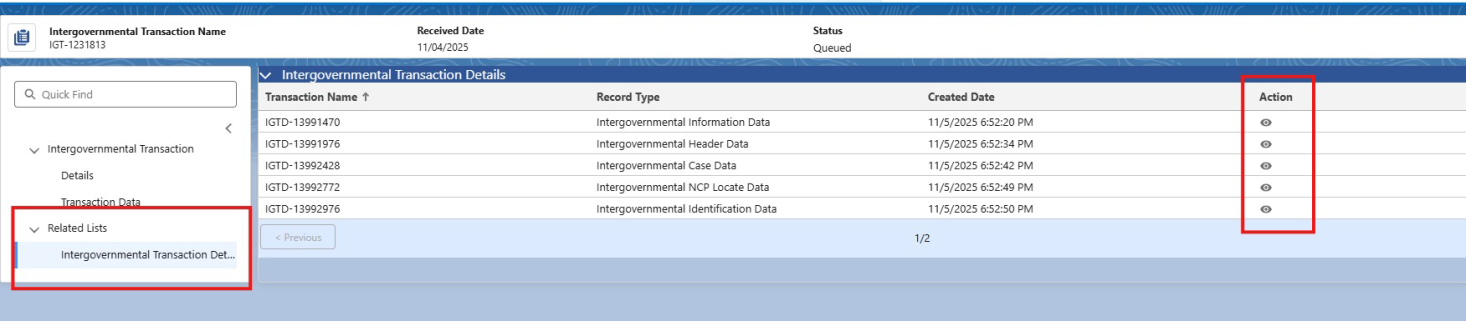
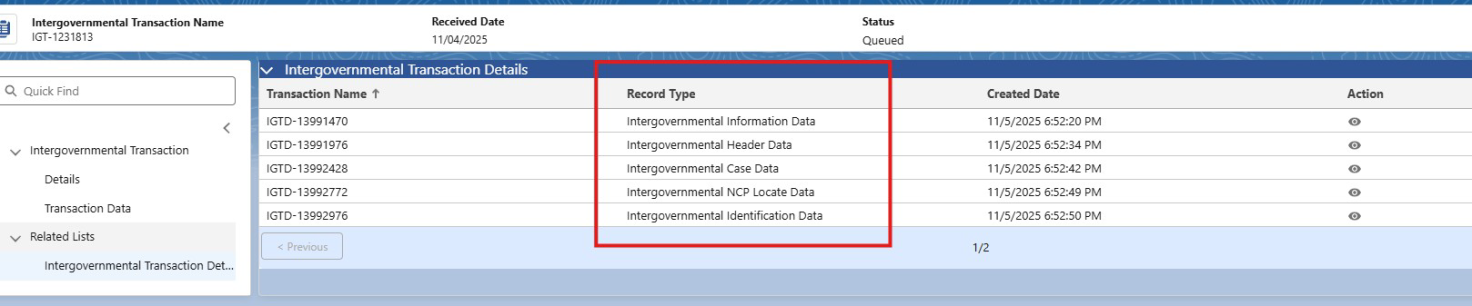
  2. In the left-side panel, under Related Lists, click on Intergovernmental Transaction Details.
  3. Under the Actions column, select the eyeball for each transaction to review the information provided.
  4. Copy the information by highlighting and right-clicking, select “Copy”.
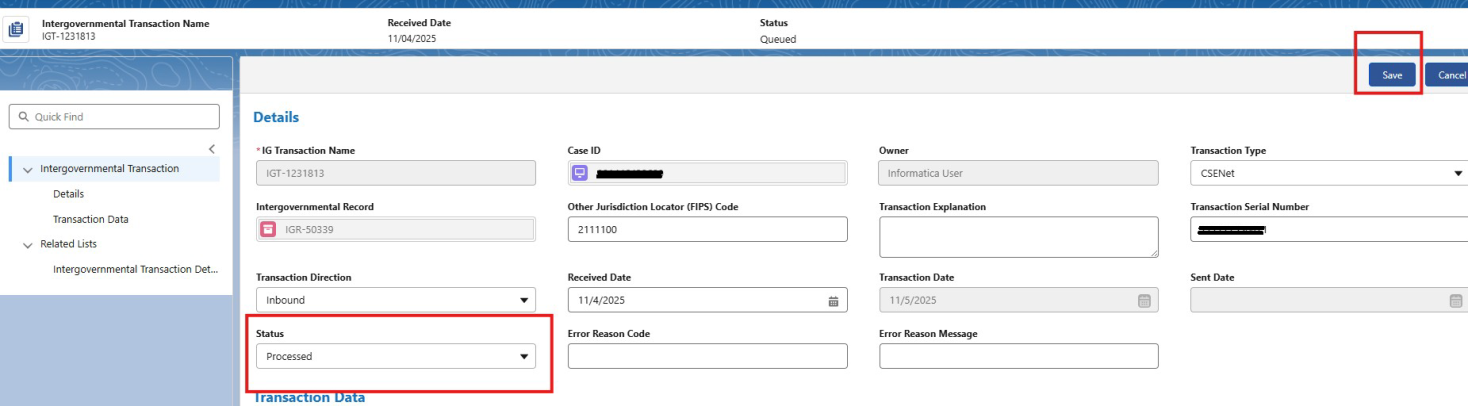
  5. Once the information is retrieved, navigate to the details screen on the left-side panel under Intergovernmental Transactions and change the status from “Queued” to “Processed”.
  6. Click Save.

6

  1. Documenting a CSENet Transaction:
  2. Navigate to the Case page and select the Activity History.
  3. Click New, and a pop-up should display. Enter the Activity Code T0201 CSENET FROM. Narrate the CSENet Request/Information in the Comments box.
  4. Click save.
  5. To ensure that all details are accounted for, review the Transaction Data screen and look for any checked boxes. This will tell you which Transaction Details records have information.

7

  1. Documenting a blank CSENet Transaction:
  2. If the Additional Information box in a transaction is blank and has no additional information in the Intergovernmental Transaction Details, continue to enter the Activity Code T0201, and narrate “No information received”.

8

  1. Clearing out the Task Code:
  2. On the left side panel under Related List, select Task Details.
  3. Double-click on the Status column to filter to “Not Started”.
  4. Select the task referencing the CSENet by clicking on the eyeball icon.
  5. Under the Status drop-down, change “Not Started” to “Completed”.
  6. Click Save
  7. Proceed with the next appropriate action on the case.