STANDARDIZED WORK - Written Translation


Date/Version: 2/11/2025 v.6

Process Owner: Policy Team

Review Cadence: Annually

Purpose - The purpose of this standard work document is to outline the process that Policy staff are to take when requests for written translation are received and that meet the criteria below, which are sent to a contracted translation vendor.
Step (1,2,3..) Process Step (list of the critical process steps) Dialogue (clear and simple descriptions, appropriate level of detail for the task)
1.

Translation Request Received

  1. A Case Manager or other DCSS employee requests a translation by sending the required documents to the translation mailbox [email protected].
  2. The translation request email must include the following items;
  3. Request for Translation Services form (CSE-1212A) found in The PORT or on the DES Document Center.
  4. Review Request for Translation Services form (CSE-1212A) and ensure all fields are correctly filled out.
  5. Verify Mail Drop for billing purposes. The case manager and the Mail Drop needs to match.
  6. A legible copy of the document(s) to be translated
  7. If document(s) for translation are incomplete or illegible, reply to the requestor informing them of the issue(s). Provide attachment or link of FYI- 439
  8. Update the Request for Translation Services form for accuracy and tracking purposes.
  9. Picture images are not to be translated, for example, a driver's license.
  10. The requestor should only submit documents that require Translation Services.
  11. Special Instructions should include detailed information for Policy to review. For example, urgent due to pending legal action and/or scheduled hearings.
  12. Acknowledge the requestor.
  13. Reply to the requestor, for any issues or concerns that may have been encountered. Refer to 2(b)(i) or
  14. Reply to the requestor, the project will move forward to the next step.
  15. Note: cc: [email protected] on all communication for tracking purposes.
2.

Translation Project Setup

  1. Verify through OnBase and AZCARES or historical folders that the translation document has not been translated before.
  2. Create a folder for each new translation request in the Google shared Translation drive.
  3. Google Shared Drive: DCSS ALL> 10. Policy & Resource Administration> Policy> Written Translations> Current Year (Folder Name: Oct XXX - Sep XXXX)
  4. Title folder, Support Recipient vs Support Payor names, and AZCARES case number.
  5. Title document, Support Recipient vs Support Payor names, and AZCARES case number, and save to the folder.
  6. Create a new record in the Translation Tracking Log under the current fiscal year and month.
  7. Google Shared Drive: DCSS ALL> 10. Policy & Resource Administration> Policy> Written Translations> 2. Translation Tracking Log
  8. The title folder includes the names of the Support Recipient vs Support Payor, the AZCARES case number, and the date the translation request was received.
  9. The remaining fields are to be completed as additional steps are taken throughout the translation process.
  10. Create a folder in theTranslation Gmail under the label “In Progress”
  11. Title folder, Support Recipient vs Support Payor names, AZCARES case number.
  12. All related communication regarding translation projects should be filed within the specific label.
  13. Note: Majority of clients have more than one last name.
3.

Request a Translation

  1. Create a new translation email request
  2. The subject line should read as,
  3. Request for Translation Services for Support Recipient vs Support Payor names- AZCARES case number.
  4. The body of the email should include;
  5. Request for a quote,
  6. Languages to be translate from and to ,
  7. Whether formatting, also known as desktop publishing, is needed
  8. Include the attached document(s) in PDF format.
  9. If the file is too large (more than 15 megabytes) or if you have a privacy requirement, request a secure upload link from Language Line ([email protected])
  10. Note: Language Line retitles subject to include the project number
4.

Translation Quote Received

  1. Our Translation Line vendor sends an automated response.
  2. Our Translation Line vendor will send an acknowledgment email including the project number, quote or estimated cost and timeline for the translation.
  3. Review quote or estimated cost received from Language Line for accuracy and contract pricing.
  4. Translation costs are charged per word and based on the language requested.
  5. The contract pricing sheet is in Google Shared Drive: DCSS ALL> 10. Policy & Resource Administration> Policy> Written Translations> 3. Translation Process> Language Line Price Sheet.
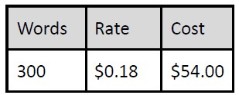
  6. Per the contract, the standard fee of 300 words or less is $54.00.
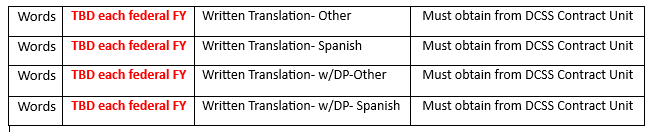
  7. Translation Services contract estimates a total amount of words each federal fiscal year (October 1st).
  1. If the received quote is incorrect or if you have questions, reply to the Language Line for clarification.
  2. Once you receive a revised quote or satisfactory clarification, proceed to obtain an approval.
  3. Note: cc: [email protected] on all communication for tracking purposes. Follow up on all tracking folders.
5.

Request Quote Approval

  1. Forward email requesting an approval to,
  1. The DCSS Budget Team at [email protected] and cc the DCSS Contract Team at [email protected].
  2. Include attached PDF document(s) and attached quote or estimated cost.
  3. Language for translation from and to.
  4. Breakdown of a quote or estimate by words, rate, and cost-See example below:
  1. The approver will respond with “Approved”
  2. If you do not receive an approval, the approver will detail the reason(s) for not approving and you will need to reach to the Language Line for clarification.
  3. Approval response turnaround must be 1 business day. Send a follow-up email if no response is received after 1 business day.
  1. Forward the approval email to our Language Line vendor to proceed.
  2. Language Line will respond with an automated email confirming receipt and assigning a project manager.
  3. The assigned project manager will acknowledge approval, confirm the project number and provide an estimated time for completion. (A deadline)
  4. Note: cc: [email protected] on all communication for tracking purposes. Follow up on all tracking folders.
6.

Inform Requestor on Project Timeline

  1. When the quote is approved, an email will be received from the Language Line project manager with the deadline of the completed translation project.
  2. Email requestor to inform the timeline.
  3. In the email, state the date.
  4. Ex) Hello XXX, We received the timeline for the requested Translation. The estimated time of delivery is MM/DD/YY.
  5. Note: If the vendor states that the translation will be ready by 5 pm on certain dates, email the requestor with the date of the next business day.
7. Completed Translation Received
  1. The project manager will send the "completed" translated document(s) in Word, PDF, and a signed certification.
  2. Ensure the certificate is included. The certificate should have the parties' full names, and AZCARES number, and must be signed. (Digital signature is accepted)
  3. Email the project manager confirming the receipt
  4. Email the following completed translated documents to and from the requestor using the original thread.
  5. Translated document(s) in Word and PDF
  6. Signed certification
  7. Note: Inform the requester to save a copy of the completed translation, and signed certification onto AZCARES or OnBase for future use.
  8. Note: cc: [email protected] on all communication for tracking purposes.
8.

Translation Project Closeout

  1. Complete tracking within each folder.
  2. Google Shared Drive: DCSS ALL> 10. Policy & Resource Administration> Policy> Translations> Current Year (Folder Name: Oct XXX - Sep XXXX)
  3. Save emails as PDFs to the Google Shared Drive
  4. Follow steps 2 (2)(3)
  5. Ensure all fields are completed within each tracking folder - Please refer to Steps 2 (4).
  6. The Mail drop must be listed for each translation for billing purposes.
9.

Translation Invoices

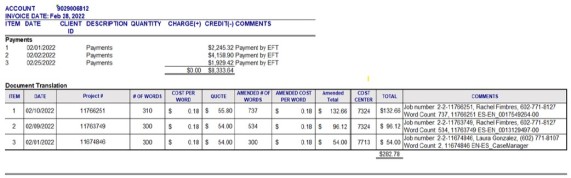
  1. Our vendor, Language Line, will email a month end invoice to DCSS Purchasing at [email protected] mailbox.
  2. Compare invoice balances to the previous month's invoice balance.
  3. Compare the listed translation to the translation tracking log.
  4. Google Shared Drive: DCSS ALL> 10. Policy & Resource Administration> Policy> Translations>2. Translation Tracking Log>Current Year (Folder Name: Oct XXX - Sep XXXX)
  5. Modify the “Misc Charges Detail” tab using the previous Invoice.
  1. For any errors are identified on the monthly invoice, the Purchasing team will e-mail the Language Line accounting mailbox [email protected] and copy Kurt Schneider [email protected].

DO NOT PRINT THIS PAGE FOR DISTRIBUTION

CHANGE LOG
Change Number Change Proposed Updated by?

Change Made?

Yes/No

Reason Date Finalized
1 File locations updated to Google Drive Change font on all pages to pink Sallie Leo Yes Staff need to be able to access files in Google 7.29.2022
2

File locations updated to Google Drive

Janice Garza

Yes

Staff need to be able to access files in Google

3.24.2023

3

Step 5 & 8 are updated

Seul (Janice) Park

Yes

The process being changed with Quote approvals and receiving invoices

3.24.2023

4

The entire SW was reviewed and comments made by Laura Gonzalez

Laura Gonzalez

Yes

The entire SW including updated steps were reviewed and comments were entered.

3.27.2023

5

Steps 5,6,7, and 8 are updated

Seul (Janice) Park

Yes

Suggested changes/updates are accepted

3.29.2023

6

Step 5, Section 1 - email to Budget team instead of Anabel Mora

Seul (Janice) Park

Yes

Changes/updates accepted and resolved

6.27.2023

7 Step 8, Section 4-i - Request email box or backup person in case of Kurt’s absence. Ivonne Manriquez / Seul (Janice) Park Yes Ivonne provided LanguageLine’s accounting email address. 9.13.2023
8

V.5 &

Step 5, Section A.-1. Request to add DCSS RX Request email when quote is forward to the Budget Team.

Laura Gonzalez Yes Billing purposes so Invoices are paid on time. 4/23/2024
9 Date/Version updated from (4/23/2024 v.5) to (4/23/2024 V.6) Laura Gonzalez Yes Date/Version updated from (4/23/2024 v.5) to (4/23/2024 V.6) 2/10/2025
10 V.5 & Step 5, Section A.-1. Request to remove DCSS RX Request email [email protected] and replace with DCSS Contract Team email [email protected] when quote is forwarded to the Budget Team. Laura Gonzalez Yes Request from new Contracts Manager Kaitlin Burreson. 2/10/2025
11 Step 1, Section 2-a. Updated links to updated CSE-1212A document Laura Gonzalez Yes The CSE-1212A document was updated. 2/11/2025
12 Step 1, Section 2-b.i. Replaced old FYI-353 with new FYI-439 Laura Gonzalez Yes New FYI-439 issued 2/11/2025
13 Step 2, Section 1. Added AZCARES Laura Gonzalez Yes Align with the new system AZCARES 2/11/2025
14 Step 2, Section 2-b. Replaced NCP vs CP last names with Support Recipient vs Support Payor names Laura Gonzalez Yes Align with new system AZCARES terminology 2/11/2025
15 Step 2, Section 3-b. Replaced NCP vs CP last names with Support Recipient vs Support Payor names Laura Gonzalez Yes Align with new system AZCARES terminology 2/11/2025
16 Step 2, Section 4-a. Replaced NCP vs CP last names with Support Recipient vs Support Payor names Laura Gonzalez Yes Align with new system AZCARES terminology 2/11/2025
17 Step 3, Section 1-a.i. Replaced ATLAS with AZCARES and NCP vs CP last names with Support Recipient vs Support Payor names Laura Gonzalez Yes Align with new system AZCARES terminology 2/11/2025
18 Step 4, Section 3.b. Google Shared Drive: DCSS ALL> 10. Policy & Resource Administration> Policy> Written Translations> 3. Translation Process> Language Line Price Sheet Laura Gonzalez Yes Updated file from PRA J-drive with Google Shared Drive 2/11/2025
19 Step 7, Section 1-a. The certification should have the party's full name, and AZCARES number, and must be signed. (Digital signature is accepted) Laura Gonzalez Yes The following sentence was added to make sure we check this information on the certificate before approving the translation. The information should align with the case. 2/11/2025
20 Step 7, Section Note. Added AZCARES Laura Gonzalez Yes Align with the new system AZCARES 2/11/2025
21 Step 2, Section 3. sentence c. was added. James Hinson Yes We need to title the documents so they align with the certificate and case. 2/19/2025